Graphics 1 - Work on your MOVIE POSTERS.
Multimedia 1 - Work on your 5 CORRECTIONS from yesterday. Make sure you crop & straighten the other photos in your collection for best composition. Start of your SLIDESHOW in iMovie.
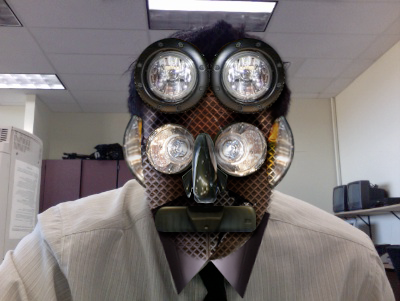
Graphics 2 - Your WPA posters are due on your blog today. Work on the CARFACE project.
Thursday, October 28, 2010
Day 35 - Wednesday, October, 27, 2010
Graphics 1 - Work on your posters, I will demo your next project, the TYPE ON A PATH project.
Multimedia 1 - Today I will demo the the 5 photo edits that are to be included in your slide show. Use a different photo for EACH effect. THRESHOLD, B&W, ISOLATE, INVERT, & BEST CORRECTION. Save these as JPEG. DO NOT SAVE OVER THE ORIGINALS.
Graphics 2 - Work on your CARFACE project. You WPA posters are due on your blog THURSDAY.
Multimedia 1 - Today I will demo the the 5 photo edits that are to be included in your slide show. Use a different photo for EACH effect. THRESHOLD, B&W, ISOLATE, INVERT, & BEST CORRECTION. Save these as JPEG. DO NOT SAVE OVER THE ORIGINALS.
Graphics 2 - Work on your CARFACE project. You WPA posters are due on your blog THURSDAY.
Tuesday, October 26, 2010
Day 34 - Multimedia QUIZ today!!!
Graphics 1 - Work on Movie Posters.
Multimedia 1 - Today you have your VOCAB quiz. We will look at the rest of your pics and CROP and STRAIGHTEN them.
Graphics 2 - Finish up your WPA posters. If you are done, start on your CARFACE assignment that was demoed yesterday.
Multimedia 1 - Today you have your VOCAB quiz. We will look at the rest of your pics and CROP and STRAIGHTEN them.
Graphics 2 - Finish up your WPA posters. If you are done, start on your CARFACE assignment that was demoed yesterday.
Sunday, October 24, 2010
Day 33 - 25 photos & posters
Graphics 1 - You have next week to work on your POSTERS, then we will look at your progress.
Multimedia 1 - You have 25 pics due on MONDAY, remember no excuses.
Graphics 2 - Finish up you posters.
Multimedia 1 - You have 25 pics due on MONDAY, remember no excuses.
Graphics 2 - Finish up you posters.
Wednesday, October 20, 2010
Day 32 - Photoshopery, Bob Marley, & Posters
Graphics 1 - Work on your MOVIE POSTERS. I will demo some videos on our techniques. Today I will show the BOB MARLEY vector video.
Multimedia 1 - Today you will finish up your terms and I will demo how to crop and alter colors in PHOTOSHOP. Your PHOTOGRAPHY ASSIGNMENT is due on MONDAY!
Graphics 2 - We will take a look at your progress today.
Multimedia 1 - Today you will finish up your terms and I will demo how to crop and alter colors in PHOTOSHOP. Your PHOTOGRAPHY ASSIGNMENT is due on MONDAY!
Graphics 2 - We will take a look at your progress today.
Day 31 - Tuesday Oct. 19, 2010
Graphics 1 - MOVIE POSTERS. I demoed a few videos by professionals doing the same techniques.
Multimedia 1 - Today I will handout your PHOTO ASSIGNMENT sheets for the weekend. Remember, your photos are due MONDAY, no excuses. I will go over the various shots you are required to take.
Graphics 2 - NONPROFIT POSTERS.
Multimedia 1 - Today I will handout your PHOTO ASSIGNMENT sheets for the weekend. Remember, your photos are due MONDAY, no excuses. I will go over the various shots you are required to take.
Graphics 2 - NONPROFIT POSTERS.
Tuesday, October 19, 2010
Day 30 - Monday Oct. 18, 2010
Graphics 1 - Work on your MOVIE POSTERS.
Multimedia 1 - 1st Hour - Today I gave notes on basic camera terms and techniques for the quiz. 9th Hour - SUBSTITUTE TODAY, please use the internet to define the terms on your handout, they are due by the end of the hour. TERMS HANDOUT.
Graphics 2 - Work on your NONPROFIT POSTER.
Multimedia 1 - 1st Hour - Today I gave notes on basic camera terms and techniques for the quiz. 9th Hour - SUBSTITUTE TODAY, please use the internet to define the terms on your handout, they are due by the end of the hour. TERMS HANDOUT.
Graphics 2 - Work on your NONPROFIT POSTER.
Subscribe to:
Posts (Atom)